In today’s fast-paced digital business environment, missing customer inquiries can directly impact sales and business growth. Many businesses receive leads from their website but fail to manage them properly due to disconnected systems and manual processes.
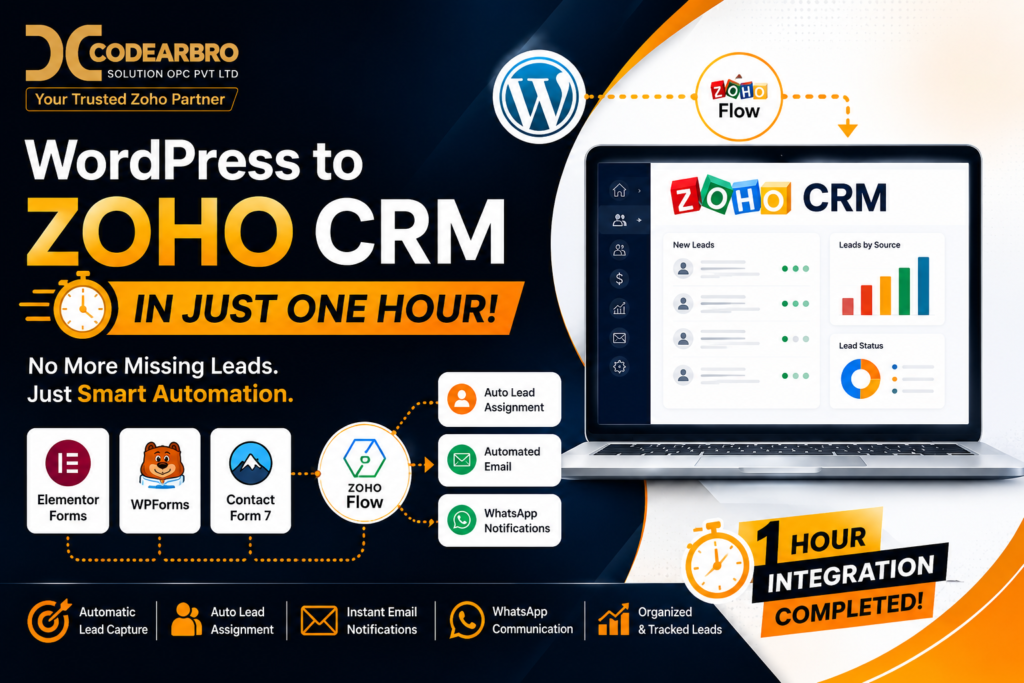
At CodeArbro Solution OPC Pvt Ltd, we recently helped a customer solve this exact challenge by integrating their WordPress website with Zoho CRM using Zoho Flow automation.
The complete integration was successfully implemented within just one hour and transformed the client’s lead management process into a fully automated system.
This solution enabled:
- Automatic lead capture from WordPress
- Organized lead management inside Zoho CRM
- Automatic lead assignment to salespersons
- Instant customer email notifications
- Automated WhatsApp communication
- Elimination of manual lead handling
The result was a streamlined workflow with zero missing leads and significantly faster customer response time.
The Client’s Problem
The client was receiving inquiries from multiple forms on their WordPress website, including:
- Elementor Forms
- WPForms
- Contact Form 7
However, their leads were scattered across emails and form dashboards, making it difficult to manage customer inquiries efficiently.
The business faced several issues:
- Leads were getting missed
- Salespersons were responding late
- No centralized lead tracking system existed
- Manual lead assignment consumed time
- Follow-up communication was inconsistent
The customer needed a centralized CRM solution that could automate the entire process.
The Solution by CodeArbro
At CodeArbro Solution OPC Pvt Ltd, we designed a complete automation workflow using:
- WordPress
- Zoho CRM
- Zoho Flow
The objective was to create a smart lead automation system that could capture, organize, assign, and communicate with leads automatically.
Technologies Used in the Integration
1. WordPress Website
The client website was built on WordPress and used multiple form plugins for collecting inquiries.
2. Zoho CRM
Zoho CRM was used as the central platform for managing all incoming leads and customer data.
The CRM helped organize:
- Customer inquiries
- Lead status
- Salesperson assignments
- Follow-up activities
- Customer communication history
3. Zoho Flow
Zoho Flow acted as the automation bridge between WordPress and Zoho CRM.
Using Zoho Flow, we automated:
- Form data transfer
- Lead creation
- Lead assignment
- Email notifications
- WhatsApp notifications
This eliminated the need for manual work completely.
WordPress Forms Integrated with Zoho CRM
One of the most interesting parts of this project was integrating multiple WordPress form systems into a single CRM workflow.
Elementor Forms Integration with Zoho CRM
The website used Elementor Forms for customer inquiries.
We connected Elementor Forms directly with Zoho CRM using Zoho Flow automation so that every submission automatically created a lead inside the CRM.
Benefits:
- Instant lead creation
- No manual data entry
- Faster response time
WPForms Integration with Zoho CRM
WPForms submissions were also integrated into the CRM system.
We mapped all required fields properly to ensure accurate lead capture and smooth automation.
This helped maintain clean and organized customer data.
Contact Form 7 Integration with Zoho CRM
The website also used Contact Form 7 for some inquiry pages.
We integrated Contact Form 7 with Zoho CRM using Zoho Flow, ensuring all customer inquiries from every form plugin entered the same centralized CRM system.
How the Automation Workflow Worked
The automation system was designed to simplify the entire lead management process.
Step 1: Customer Submits Website Form
A visitor fills out a form on the WordPress website.
Step 2: Zoho Flow Captures Form Data
Zoho Flow instantly captures the submitted information from:
- Elementor Forms
- WPForms
- Contact Form 7
Step 3: Lead Automatically Created in Zoho CRM
The submitted data is automatically transferred into Zoho CRM as a new lead.
No manual entry is required.
Step 4: Automatic Lead Assignment
Based on predefined conditions such as:
- Location
- Service type
- Lead source
- Customer category
The lead is automatically assigned to the appropriate salesperson.
This significantly improved lead response time.
Step 5: Automated Email Sent to Customer
Immediately after lead creation, the customer receives an automated email confirmation.
This helps:
- Improve customer trust
- Acknowledge the inquiry instantly
- Start professional communication immediately
Step 6: WhatsApp Notification Triggered
The automation workflow also sends WhatsApp notifications to:
- The customer
- The assigned salesperson
This ensures quick communication and faster follow-up.
Major Benefits of Zoho CRM Integration
1. No More Missing Leads
All inquiries are now stored safely inside Zoho CRM.
Every lead is tracked properly.
2. Organized Lead Management
The business owner can now manage all leads from one centralized dashboard.
3. Faster Sales Response
Automatic lead assignment reduced delays and improved sales efficiency.
4. Better Customer Experience
Customers now receive:
- Instant responses
- Automated emails
- Faster communication
- Professional follow-ups
5. Reduced Manual Work
Automation eliminated repetitive tasks and improved productivity.
Why Businesses Need WordPress and Zoho CRM Integration
Businesses using WordPress websites often struggle with lead management when inquiries increase.
Integrating WordPress with Zoho CRM helps businesses:
- Centralize customer inquiries
- Improve lead tracking
- Increase sales conversion
- Automate customer communication
- Eliminate manual processes
- Improve operational efficiency
For growing businesses, CRM automation is no longer optional — it is essential.
Why Choose CodeArbro as Your Zoho Partner
CodeArbro Solution OPC Pvt Ltd specializes in:
- Zoho CRM Integration
- WordPress CRM Automation
- Zoho Flow Automation
- Lead Management Systems
- WhatsApp Automation
- CRM Customization
- Business Process Automation
Our team helps businesses automate operations quickly and efficiently using modern CRM technologies.
Final Results Achieved
After implementing the solution:
- Leads became fully organized
- Manual work was eliminated
- Customer response time improved
- Sales follow-up became faster
- Automated communication improved customer experience
- No customer inquiry was missed
Most importantly, the complete integration was completed within just one hour.
Conclusion
Integrating WordPress with Zoho CRM can completely transform how businesses manage customer inquiries and sales processes.
Using Zoho Flow automation, CodeArbro successfully integrated:
- Elementor Forms
- WPForms
- Contact Form 7
- Zoho CRM
- Automated Emails
- WhatsApp Notifications
The result was a smarter, faster, and fully automated lead management system.
If your business is struggling with missing leads or inefficient follow-ups, Zoho CRM integration with WordPress can help streamline your entire sales workflow.
FAQs
What is Zoho CRM integration with WordPress?
Zoho CRM integration connects your WordPress website forms directly with Zoho CRM, allowing automatic lead capture and management.
Can Elementor Forms integrate with Zoho CRM?
Yes, Elementor Forms can be integrated with Zoho CRM using Zoho Flow or custom API integrations.
What is Zoho Flow?
Zoho Flow is an automation platform that connects different applications and automates workflows without coding.
Can Contact Form 7 connect with Zoho CRM?
Yes, Contact Form 7 can be connected with Zoho CRM using Zoho Flow or API-based automation.
Why is CRM automation important?
CRM automation helps businesses improve lead management, reduce manual work, increase response time, and improve customer experience.